Interactive Cat Buttons 101: Your First 30 Days with AAC Speech Buttons
Introduction
Cats may not speak our language, but they’ve been “talking” to us for centuries—through meows, purrs, chirps, and even that demanding stare when it’s mealtime. Thanks to modern pet technology, we now have a new way to deepen our communication with our feline friends: AAC (Augmentative and Alternative Communication) speech buttons, also known as interactive cat buttons.
You may have seen viral videos of cats pressing buttons labeled “food,” “play,” or “outside” and wondered: Can my cat really do this too? The answer is yes—if you have patience, consistency, and a clear plan.
This guide, Interactive Cat Buttons 101: Your First 30 Days with AAC Speech Buttons, walks you through what to expect, how to set up your system, and how to succeed during the crucial first month.
What Are Interactive Cat Buttons?
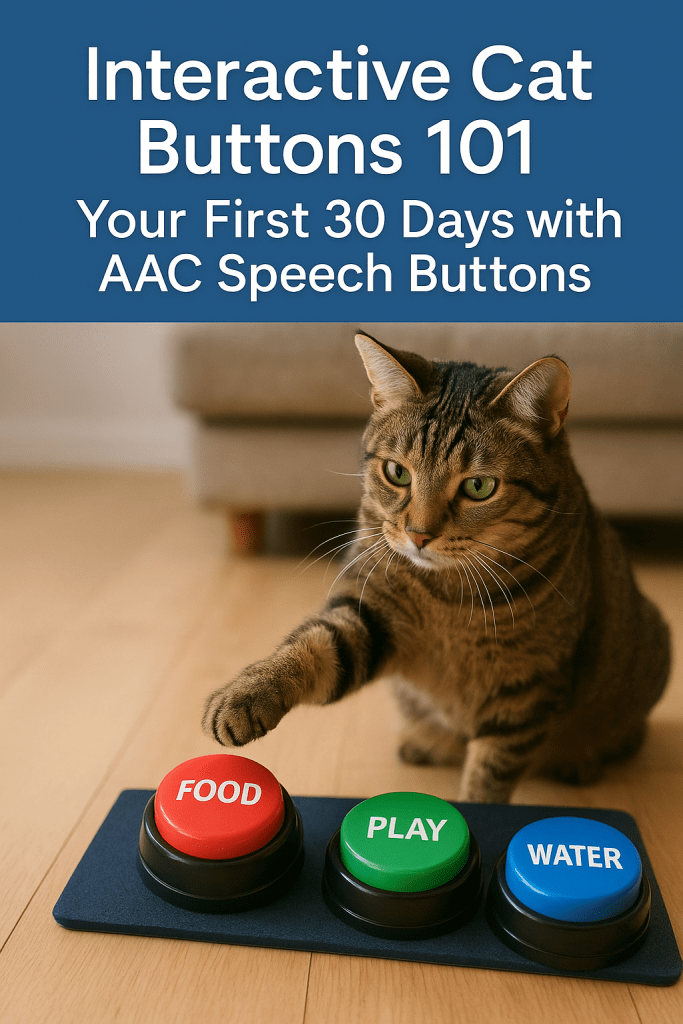
Interactive cat buttons are small, recordable sound buttons. Each button can be programmed with a word or phrase—your voice saying “treat,” “play,” “water,” or anything else you choose. When your cat presses the button with a paw, it plays the recorded sound.
Why Use Them with Cats?
- Enhanced communication: They give your cat a “voice” to express needs and desires.
- Mental enrichment: Button training stimulates your cat’s brain and keeps them engaged.
- Bond building: Cats learn that pressing a button creates a predictable response from their human.
- Behavioral benefits: Buttons can reduce frustration or unwanted behaviors by giving cats a clear outlet for communication.
Note: While AAC buttons are more popular with dogs, cats are equally capable of learning. Their independent nature means progress may be slower, but the results can be deeply rewarding.
Setting Expectations: Can All Cats Learn Buttons?
Not every cat will become a fluent “speaker,” and that’s okay. Your cat’s success depends on:
- Age: Kittens and younger adults tend to learn faster, but seniors can also succeed.
- Personality: Curious, social, or food-motivated cats often take to buttons more easily.
- Consistency: Daily practice and reinforcement are key.
- Environment: A calm, stable household accelerates learning.
Some cats will master a dozen buttons; others may only use one or two consistently. The goal is not quantity—it’s quality communication.
Preparing for Your First 30 Days
Before jumping in, gather what you need:
- AAC Speech Buttons
- Popular options: FluentPet, Learning Resources buttons, or other recordable buzzers.
- Look for buttons that are easy to press with a cat’s paw.
- Mats or Organizers
- Keep buttons from sliding. Cats get frustrated if they move around.
- Word Choices
- Start simple: food, play, water, cuddle.
- Pick words tied to daily routines.
- Recording Setup
- Use a clear, consistent tone of voice.
- Keep each button’s word short and distinct.
- Rewards
- Treats, play sessions, or praise to reinforce correct use.
The First 30 Days: Step-by-Step Guide
Week 1: Introduction and Familiarization
- Set up 1–2 buttons in a common area (near food or favorite resting spots).
- Suggested words: food and play.
- Demonstrate by pressing the button every time you do the associated action.
- Example: Press food before filling the bowl.
- Encourage exploration: let your cat sniff or paw the button without pressure.
- Reward any interaction—nose touches, paw taps, or even looking at the button.
Tip: Cats learn by association. Repetition is your best friend.
Week 2: Association and Early Understanding
- Continue pressing the buttons consistently during routines.
- Begin gently guiding your cat’s paw to the button (without forcing).
- Reward heavily when your cat makes contact.
- Watch for signs of recognition:
- Cat waits near the button at meal times.
- Cat paws at the button when they want food or play.
- Keep sessions short (3–5 minutes). Cats thrive on brief, positive training bursts.
Week 3: First Independent Uses
- Some cats will press their first button this week. Celebrate!
- Respond immediately when the button is pressed.
- If play is pressed, grab a toy right away.
- If food is pressed, reward with a snack or meal (if appropriate).
- Add a third button (e.g., cuddle or water).
- Be consistent: every button press should have a predictable response.
Warning: Don’t ignore a valid button press, or your cat may lose interest.
Week 4: Building Momentum and Expanding Vocabulary
- By now, your cat may be pressing at least one button intentionally.
- Add another new button tied to your cat’s daily routine. Examples:
- outside (if you use a leash or catio)
- window (for bird-watching spots)
- treat (very motivating for most cats)
- Start encouraging choice-making:
- Place food and play buttons together.
- Ask, “What do you want?” and let your cat choose.
- Track progress: keep a log of when and how buttons are used.
Troubleshooting Common Issues
“My cat ignores the buttons.”
- Try using higher-value rewards (treats, favorite toy).
- Reduce distractions during training.
- Be more consistent in pressing buttons yourself.
“My cat just sits on the buttons.”
- Cats love sitting on things! Redirect gently.
- Reward only purposeful presses, not accidental ones.
“My cat presses randomly.”
- This is normal in early stages.
- Respond consistently but watch for patterns. Random presses often become intentional with time.
“My cat only uses one button.”
- That’s still success! Some cats prefer one “go-to” word.
- Expand slowly, but respect your cat’s pace.
Beyond 30 Days: What Comes Next?
After the first month, you and your cat may be ready to:
- Expand Vocabulary: Add buttons for favorite people, nap spots, or emotions (like mad or happy).
- Create Categories: Group buttons into “food,” “play,” and “rest” zones to reduce confusion.
- Encourage Conversations: Some cats press sequences like treat + play.
- Observe Personality Insights: You may discover quirks about your cat’s preferences and routines.
Success Stories: Cats Who “Talk”
- Billi the Cat became famous on social media for using over 50 buttons.
- Justin’s cat Stella learned to request specific toys and cuddle times.
- Everyday cat owners report improved bonds and fewer behavioral issues thanks to AAC buttons.
These stories prove that patience pays off—even the most independent cats can surprise us.
Tips for Maximizing Success
- Stay Positive – Celebrate small wins.
- Be Consistent – Press the button every time you perform the action.
- Use Motivation – Food and play are the strongest incentives.
- Keep It Short – Cats prefer brief sessions, not long drills.
- Respect Boundaries – Don’t force button pressing; allow curiosity to lead.
- Document Progress – Photos, videos, or journals help track milestones.
SEO-Optimized FAQs
Do interactive buttons really work with cats?
Yes. While cats may not speak in full sentences, they can learn to associate buttons with specific outcomes and use them to communicate needs.
How many buttons should I start with?
Begin with 1–2 essential words (like food and play). Add new ones only after your cat shows understanding.
How long does it take for a cat to learn?
Some cats press their first button in 2–3 weeks, while others may take months. Patience is key.
Are certain breeds better at button training?
Curious, people-oriented breeds (like Siamese, Bengals, and Maine Coons) often excel, but any cat can learn.
What if my cat never uses the buttons?
That’s okay! Even exposure to AAC can enrich your cat’s environment and strengthen routines.
External Resources & References
- https://fluent.pet/– Popular AAC system for pets.
- https://www.tiktok.com/@billispeaks?lang=en– Example of a cat using buttons.
- https://icatcare.org/– Expert advice on feline behavior and enrichment.
- https://www.petmd.com/cat/behavior– General cat training guidance.
Conclusion
Teaching your cat to use interactive AAC speech buttons is not just a fun experiment—it’s a powerful way to give your cat a voice in your shared life. The first 30 days are about patience, consistency, and celebration of small milestones.
Whether your cat learns one button or a dozen, what matters most is the bond you build and the joy of understanding each other a little better every day.
So, set up those buttons, press them faithfully, reward generously, and let your cat surprise you. Who knows? In just a month, you may be having your first real “conversation” with your feline friend.





 Fresh Cat News: Trusted Updates for Cat Lovers & Responsible Owners
Do you found this guide useful, please leave a comment.